<?xml version="1.0" encoding="utf-8"?>
<feed xmlns="http://www.w3.org/2005/Atom">
  <title>Track Vim Galore Updates Daily</title>
  <id>https://www.trackawesomelist.com/mhinz/vim-galore/feed.xml</id>
  <updated>2018-10-03T14:30:43.000Z</updated>
  <link rel="self" type="application/atom+xml" href="https://www.trackawesomelist.com/mhinz/vim-galore/feed.xml"/>
  <link rel="alternate" type="application/json" href="https://www.trackawesomelist.com/mhinz/vim-galore/feed.json"/>
  <link rel="alternate" type="text/html" href="https://www.trackawesomelist.com/mhinz/vim-galore/"/>
  <generator uri="https://github.com/bcomnes/jsonfeed-to-atom#readme" version="1.2.2">jsonfeed-to-atom</generator>
  <icon>https://www.trackawesomelist.com/favicon.ico</icon>
  <logo>https://www.trackawesomelist.com/icon.png</logo>
  <subtitle>:mortar_board: All things Vim!</subtitle>
  <entry>
    <id>https://www.trackawesomelist.com/2018/10/03/</id>
    <title>Vim Galore Updates on Oct 03, 2018</title>
    <updated>2018-10-03T14:30:43.000Z</updated>
    <published>2018-10-03T14:30:43.000Z</published>
    <content type="html"><![CDATA[<h3><p>Additional resources / Screencasts</p>
</h3>
<ul>
<li><a href="http://vimcasts.org/episodes/archive" rel="noopener noreferrer">vimcasts.org</a></li>
</ul>

<ul>
<li><a href="https://www.youtube.com/channel/UCXPHFM88IlFn68OmLwtPmZA" rel="noopener noreferrer">By wincent</a></li>
</ul>

<ul>
<li><a href="http://derekwyatt.org/vim/tutorials/index.html" rel="noopener noreferrer">By Derek Wyatt</a></li>
</ul>
]]></content>
    <link rel="alternate" href="https://www.trackawesomelist.com/2018/10/03/"/>
    <summary>3 awesome projects updated on Oct 03, 2018</summary>
  </entry>
  <entry>
    <id>https://www.trackawesomelist.com/2018/04/10/</id>
    <title>Vim Galore Updates on Apr 10, 2018</title>
    <updated>2018-04-10T15:16:09.000Z</updated>
    <published>2018-04-10T15:16:09.000Z</published>
    <content type="html"><![CDATA[<h3><p>Ranges</p>
</h3>
<ul>
<li>Most commands act only on the current line by default. Notable exceptions are
<code>:write</code> and <code>:global</code> which act on all lines.</li>
</ul>
]]></content>
    <link rel="alternate" href="https://www.trackawesomelist.com/2018/04/10/"/>
    <summary>1 awesome projects updated on Apr 10, 2018</summary>
  </entry>
  <entry>
    <id>https://www.trackawesomelist.com/2018/01/20/</id>
    <title>Vim Galore Updates on Jan 20, 2018</title>
    <updated>2018-01-20T14:36:44.000Z</updated>
    <published>2018-01-20T14:28:26.000Z</published>
    <content type="html"><![CDATA[<h3><p>True colors / Small intro</p>
</h3>
<ul>
<li>The first line should be the same for most people and denotes the <code>$TERM</code> to
be used <em>within</em> tmux.</li>
</ul>

<ul>
<li>The second line adds the tmux-specific <code>Tc</code> (true color) capability to the
other terminfo entries of <code>xterm-256color</code>. Obviously this assumes that the
user is using <code>TERM=xterm-256color</code> <em>outside</em> of tmux.</li>
</ul>

<ul>
<li>Read <code>:h 'termguicolors'</code>.</li>
</ul>

<ul>
<li>Put <code>set termguicolors</code> in your vimrc.</li>
</ul>

<ul>
<li>Make sure your colorscheme has color definitions for GUIs. (It should contain
lines with <code>guifg</code> and <code>guibg</code>.)</li>
</ul>

<ul>
<li>Make sure your terminal emulator of choice supports true colors.</li>
</ul>

<ul>
<li>Using tmux? Configure it to add the <code>Tc</code> capability.</li>
</ul>
]]></content>
    <link rel="alternate" href="https://www.trackawesomelist.com/2018/01/20/"/>
    <summary>7 awesome projects updated on Jan 20, 2018</summary>
  </entry>
  <entry>
    <id>https://www.trackawesomelist.com/2017/11/07/</id>
    <title>Vim Galore Updates on Nov 07, 2017</title>
    <updated>2017-11-07T20:28:18.000Z</updated>
    <published>2017-11-07T20:28:18.000Z</published>
    <content type="html"><![CDATA[<h3><p>Quickfix and location lists</p>
</h3>
<ul>
<li>There is only one quickfix list. There can be multiple location lists; one per
window.</li>
</ul>

<ul>
<li>They use slightly different commands for navigation.</li>
</ul>
]]></content>
    <link rel="alternate" href="https://www.trackawesomelist.com/2017/11/07/"/>
    <summary>2 awesome projects updated on Nov 07, 2017</summary>
  </entry>
  <entry>
    <id>https://www.trackawesomelist.com/2017/06/26/</id>
    <title>Vim Galore Updates on Jun 26, 2017</title>
    <updated>2017-06-26T09:57:53.000Z</updated>
    <published>2017-06-26T09:57:53.000Z</published>
    <content type="html"><![CDATA[<h3><p>Getting help offline</p>
</h3>
<ul>
<li>VimL functions end in <code>()</code>, e.g. <code>:h reverse()</code></li>
</ul>

<ul>
<li>commands start with <code>:</code>, e.g. <code>:h :echo</code></li>
</ul>
]]></content>
    <link rel="alternate" href="https://www.trackawesomelist.com/2017/06/26/"/>
    <summary>2 awesome projects updated on Jun 26, 2017</summary>
  </entry>
  <entry>
    <id>https://www.trackawesomelist.com/2017/04/22/</id>
    <title>Vim Galore Updates on Apr 22, 2017</title>
    <updated>2017-04-22T13:18:20.000Z</updated>
    <published>2017-04-22T13:18:20.000Z</published>
    <content type="html"><![CDATA[<h3><p>Backup files</p>
</h3>
<ul>
<li><strong>Copying</strong><ol>
<li>A full copy of the original file is created and used as backup.</li>
<li>The original file gets emptied and then filled with the content of the
Vim buffer.</li>
</ol>
</li>
</ul>

<ul>
<li><strong>Renaming</strong><ol>
<li>The original file is renamed to the backup file.</li>
<li>The content of the Vim buffer gets written to a new file with the name of
the original file.</li>
</ol>
</li>
</ul>
]]></content>
    <link rel="alternate" href="https://www.trackawesomelist.com/2017/04/22/"/>
    <summary>2 awesome projects updated on Apr 22, 2017</summary>
  </entry>
  <entry>
    <id>https://www.trackawesomelist.com/2017/01/04/</id>
    <title>Vim Galore Updates on Jan 04, 2017</title>
    <updated>2017-01-04T12:16:49.000Z</updated>
    <published>2017-01-04T12:16:49.000Z</published>
    <content type="html"><![CDATA[<h3><p>Vim distributions / Screencasts</p>
</h3>
<ul>
<li><a href="https://github.com/SpaceVim/SpaceVim" rel="noopener noreferrer">spacevim (⭐19k)</a></li>
</ul>
]]></content>
    <link rel="alternate" href="https://www.trackawesomelist.com/2017/01/04/"/>
    <summary>1 awesome projects updated on Jan 04, 2017</summary>
  </entry>
  <entry>
    <id>https://www.trackawesomelist.com/2016/08/07/</id>
    <title>Vim Galore Updates on Aug 07, 2016</title>
    <updated>2016-08-07T13:29:47.000Z</updated>
    <published>2016-08-07T13:29:47.000Z</published>
    <content type="html"><![CDATA[<h3><p>Function search undo / Screencasts</p>
</h3>
<ul>
<li>A search pattern in a command (<code>/</code>, <code>:substitute</code>, ...) changes the "last used
search pattern". (It's saved in the <code>/</code> register; print it with <code>:echo @/</code>).</li>
</ul>

<ul>
<li>A simple text change can be redone with <code>.</code>. (It's saved in the <code>.</code> register;
print it with <code>:echo @.</code>).</li>
</ul>
]]></content>
    <link rel="alternate" href="https://www.trackawesomelist.com/2016/08/07/"/>
    <summary>2 awesome projects updated on Aug 07, 2016</summary>
  </entry>
  <entry>
    <id>https://www.trackawesomelist.com/2016/03/08/</id>
    <title>Vim Galore Updates on Mar 08, 2016</title>
    <updated>2016-03-08T12:18:09.000Z</updated>
    <published>2016-03-08T12:18:09.000Z</published>
    <content type="html"><![CDATA[<h3><p>Cscope</p>
</h3>
<ul>
<li>Where is this symbol defined?</li>
</ul>

<ul>
<li>Where is this symbol used?</li>
</ul>

<ul>
<li>What is this global symbol's definition?</li>
</ul>

<ul>
<li>Where did this variable get its value?</li>
</ul>

<ul>
<li>Where is this function in the source files?</li>
</ul>

<ul>
<li>What functions call this function?</li>
</ul>

<ul>
<li>What functions are called by this function?</li>
</ul>

<ul>
<li>Where does the message "out of space" come from?</li>
</ul>

<ul>
<li>Where is this source file in the directory structure?</li>
</ul>

<ul>
<li>What files include this header file?</li>
</ul>
]]></content>
    <link rel="alternate" href="https://www.trackawesomelist.com/2016/03/08/"/>
    <summary>10 awesome projects updated on Mar 08, 2016</summary>
  </entry>
  <entry>
    <id>https://www.trackawesomelist.com/2016/01/19/</id>
    <title>Vim Galore Updates on Jan 19, 2016</title>
    <updated>2016-01-19T21:53:01.000Z</updated>
    <published>2016-01-19T21:53:01.000Z</published>
    <content type="html"><![CDATA[<h3><p>Getting help offline (alternative)</p>
</h3>
<ul>
<li>Options are enclosed in single quotes. So you would use <code>:h 'list'</code> to go to
the help topic for the list option. If you only know, you are looking for a
certain option, you can also do <code>:h options.txt</code> to open the help page which
describes all option handling and then you can search using regular
expressions e.g. <code>/width</code>. Certain options have their own namespace, e.g. <code>:h cpo-a</code>, <code>:h cpo-A</code>, <code>:h cpo-b</code>, and so on.</li>
</ul>

<ul>
<li>Normal mode commands are just that. Use <code>:h gt</code> to go to the help page for
the "gt" command.</li>
</ul>

<ul>
<li>Regexp items always start with "/", so <code>:h /\+</code> takes you to the help item
for the "+" quantifier in Vim regexes. If you need to know anything about
regular expressions, start reading at <code>:h pattern.txt</code>.</li>
</ul>

<ul>
<li>Key combinations. They usually start with a single letter indicating the mode
for which they can be used. E.g. <code>:h i_CTRL-X</code> takes you to the family of
CTRL-X commands for insert mode which can be used to auto complete different
things. Note that certain keys will always be written the same, e.g. Control
will always be CTRL. Note, for normal mode commands, the "n" is left away,
e.g. <code>:h CTRL-A</code>. In contrast, <code>:h c_CTRL-R</code> will describe what CTRL-R does
when entering commands in the command line and <code>:h v_Ctrl-A</code> talks about
incrementing numbers in visual mode and <code>:h g_CTRL-A</code> talks about the g
command (thus you have to press "g" then ). Here the "g" stand for
the normal command "g" which always expect a second key before doing
something similar to the commands starting with "z".</li>
</ul>

<ul>
<li>Registers always start with "quote" so use <code>:h quote</code> to find out about the
special ":" register.</li>
</ul>

<ul>
<li>Vim script (VimL) is available at <code>:h eval.txt</code>. Certain aspects of the
language are available at <code>:h expr-X</code> where 'X' is a single letter, e.g. <code>:h expr-!</code> will take you to the topic describing the '!' (Not) operator for
VimL. Also important, see <code>:h function-list</code> to find a short description of
all functions available.</li>
</ul>

<ul>
<li>Mappings are talked about in the help page <code>:h map.txt</code>. Use <code>:h mapmode-i</code>
to find out about the <code>:imap</code> command. Also use <code>:map-topic</code> to find out
about certain subtopics particular for mappings (e.g. <code>:h :map-local</code> for
buffer-local mappings or <code>:h map_bar</code> for how the '|' is handled in mappings.</li>
</ul>

<ul>
<li>Command definitions are talked about at <code>:h command-*</code>, so use :h command-bar
to find out about the '!' argument for custom commands.</li>
</ul>

<ul>
<li>Window management commands always start with CTRL-W, so you find the
corresponding help at <code>:h CTRL-W_*</code> (e.g. <code>:h CTRL-W_p</code> for switch to the
previously accessed window). You can also access <code>:h windows.txt</code> and read
your way through, if you are looking for window handling command.</li>
</ul>

<ul>
<li>Ex commands always start with ":", so <code>:h :s</code> covers the ":s" command.</li>
</ul>

<ul>
<li>Use CTRL-D after typing a topic and let Vim try to complete to all available
topics.</li>
</ul>

<ul>
<li>Use <code>:helpgrep</code> to search in all help pages (usually also includes help
pages by installed plugins). See <code>:h :helpgrep</code> for how to use it. Once you
have searched for a topic, all matches are available in the quickfix (or
location) window which can be opened with <code>:copen</code> or <code>:lopen</code>. There you
can also use <code>/</code> to further filter the matches.</li>
</ul>

<ul>
<li><code>:h helphelp</code> contains some information on how to use the help.</li>
</ul>

<ul>
<li>The user manual. This describes help topics for beginners in a rather
friendly way. Start at <code>:h usr_toc.txt</code> to find the table of content (as you
might have guessed). Skimming over that help to find certain topics, .e.g
you will find an entry "Digraphs" and "Entering special characters" in
chapter 24 (so use <code>:h usr_24.txt</code> to go to that particular help page).</li>
</ul>

<ul>
<li>Highlighting groups always start with <code>hl-*</code>. E.g. <code>:h hl-WarningMsg</code> talks
about the "WarningMsg" highlighting group.</li>
</ul>

<ul>
<li>Syntax highlighting is namespaced to ":syn-topic", e.g. <code>:h :syn-conceal</code>
talks about the conceal argument for the :syn command.</li>
</ul>

<ul>
<li>Quickfix commands usually start with ":c", while location list commands
usually start with ":l".</li>
</ul>

<ul>
<li><code>:h BufWinLeave</code> talks about the BufWinLeave autocmd. Also, <code>:h autocommands-events</code> talks about all possible events.</li>
</ul>

<ul>
<li>Startup arguments always start with "-", so <code>:h -f</code> takes you to the help of
the "-f" command switch of Vim.</li>
</ul>

<ul>
<li>Compiled extra features always start with "+", so <code>:h +conceal</code> talks about
the conceal support.</li>
</ul>

<ul>
<li>Error codes can be looked up directly in the help. <code>:h E297</code> takes you
exactly to the description of the error message. Sometimes however, those
error codes are not described, but rather are listed at the Vim command that
usually causes this. E.g. <code>:h hE128</code> takes you directly to the <code>:function</code>
command.</li>
</ul>

<ul>
<li>Documentation for included syntax files is usually available at <code>:h ft-*-syntax</code>. E.g. <code>:h ft-c-syntax</code> talks about the C syntax file and the
options it provides. Sometimes, additional sections for omni completion (<code>:h ft-php-omni</code>) or filetype plugins (<code>:h ft-tex-plugin</code>) are available.</li>
</ul>
]]></content>
    <link rel="alternate" href="https://www.trackawesomelist.com/2016/01/19/"/>
    <summary>22 awesome projects updated on Jan 19, 2016</summary>
  </entry>
  <entry>
    <id>https://www.trackawesomelist.com/2016/01/18/</id>
    <title>Vim Galore Updates on Jan 18, 2016</title>
    <updated>2016-01-18T19:45:10.000Z</updated>
    <published>2016-01-18T13:38:53.000Z</published>
    <content type="html"><![CDATA[<h3><p>Ranges</p>
</h3>
<ul>
<li>Many commands take ranges.</li>
</ul>

<ul>
<li>An address denotes a certain line.</li>
</ul>

<ul>
<li>A range is either a single address or a pair of addresses separated by either
<code>,</code> or <code>;</code>.</li>
</ul>

<ul>
<li>Ranges tell commands which lines to act on.</li>
</ul>
<h3><p>Macros</p>
</h3>
<ul>
<li>Start recording by typing <code>q</code> followed by the register, e.g. <code>q</code>. (The
command-line will signify this via "recording @q".)</li>
</ul>

<ul>
<li>Stop recording by hitting <code>q</code> once again.</li>
</ul>

<ul>
<li>Execute the macro via <code>[count]@q</code>.</li>
</ul>

<ul>
<li>Repeat the last used macro via <code>[count]@@</code>.</li>
</ul>
]]></content>
    <link rel="alternate" href="https://www.trackawesomelist.com/2016/01/18/"/>
    <summary>8 awesome projects updated on Jan 18, 2016</summary>
  </entry>
  <entry>
    <id>https://www.trackawesomelist.com/2016/01/13/</id>
    <title>Vim Galore Updates on Jan 13, 2016</title>
    <updated>2016-01-13T13:56:34.000Z</updated>
    <published>2016-01-13T13:56:34.000Z</published>
    <content type="html"><![CDATA[<h3><p>Cheatsheets</p>
</h3>
<ul>
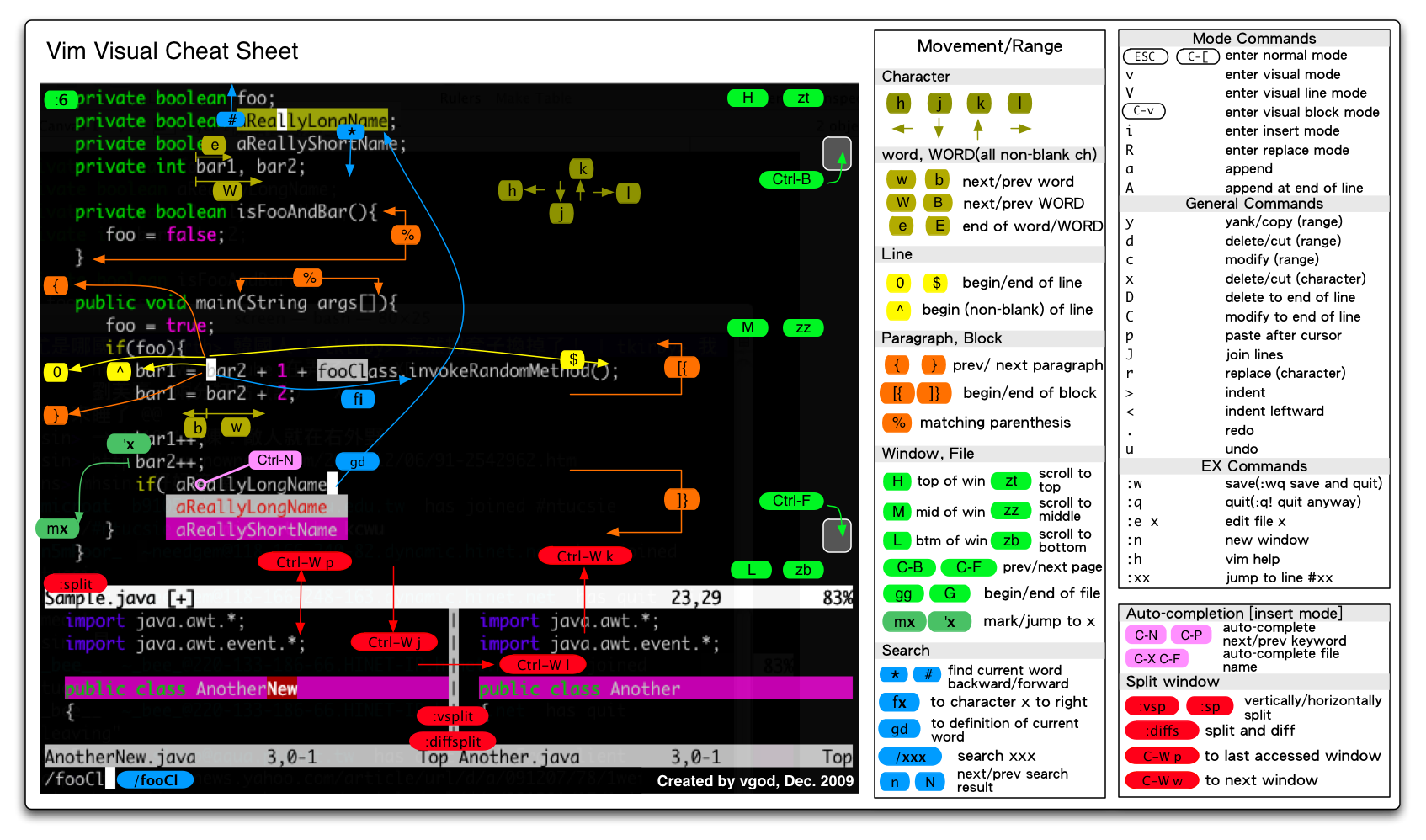
<li><a href="http://people.csail.mit.edu/vgod/vim/vim-cheat-sheet-en.png" rel="noopener noreferrer">http://people.csail.mit.edu/vgod/vim/vim-cheat-sheet-en.png</a></li>
</ul>

<ul>
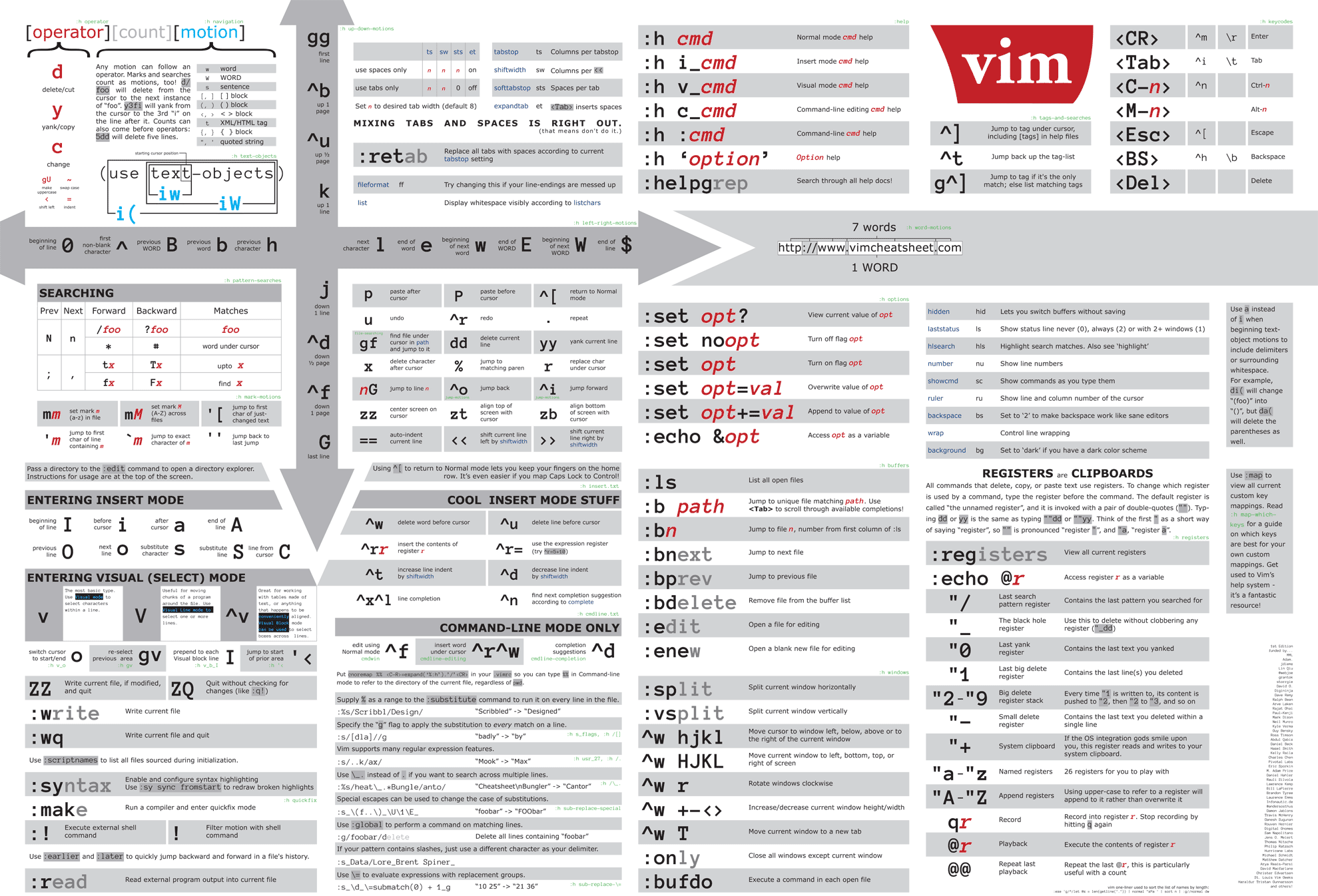
<li><a href="https://cdn.shopify.com/s/files/1/0165/4168/files/preview.png" rel="noopener noreferrer">https://cdn.shopify.com/s/files/1/0165/4168/files/preview.png</a></li>
</ul>

<ul>
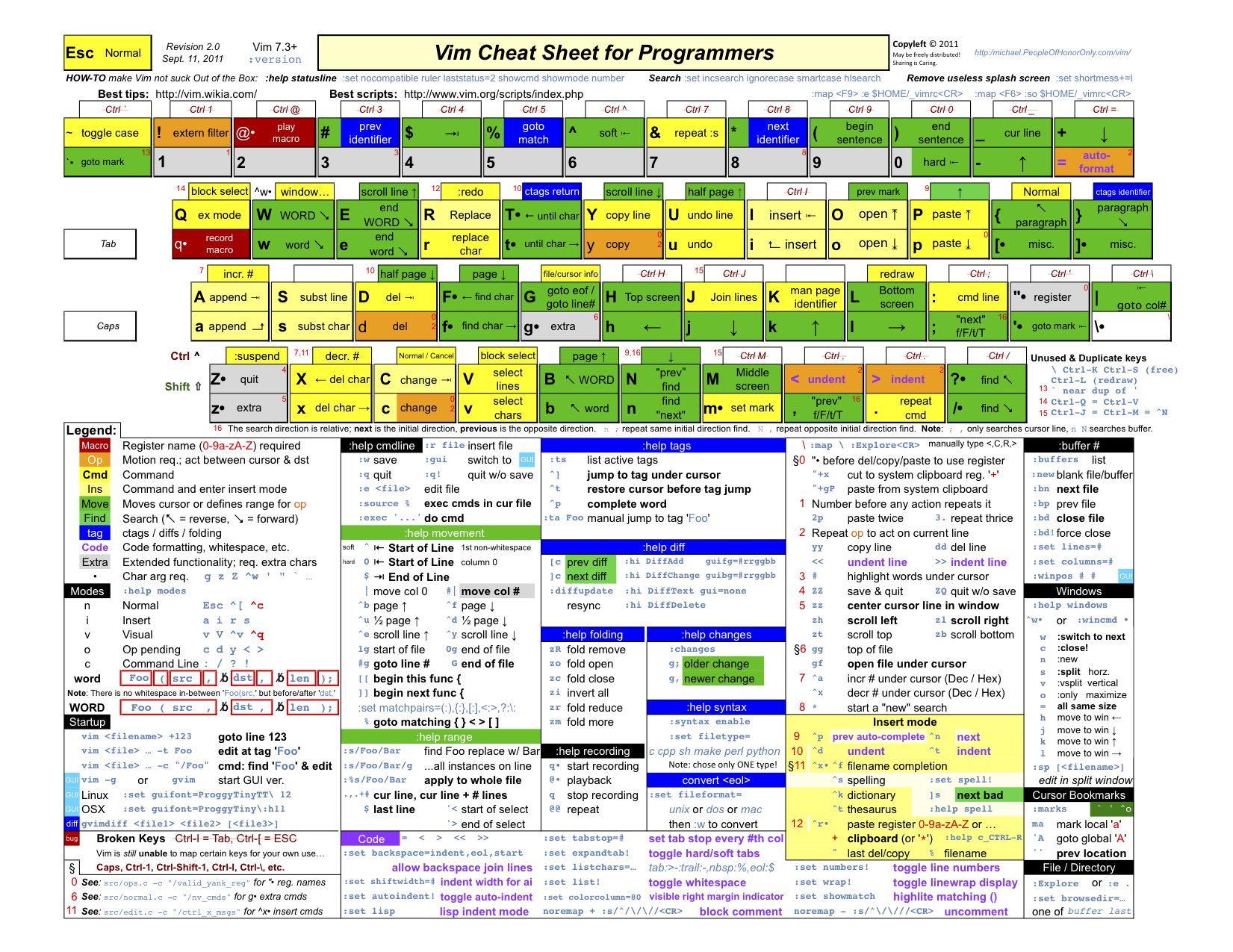
<li><a href="http://michael.peopleofhonoronly.com/vim/vim_cheat_sheet_for_programmers_screen.png" rel="noopener noreferrer">http://michael.peopleofhonoronly.com/vim/vim_cheat_sheet_for_programmers_screen.png</a></li>
</ul>

<ul>
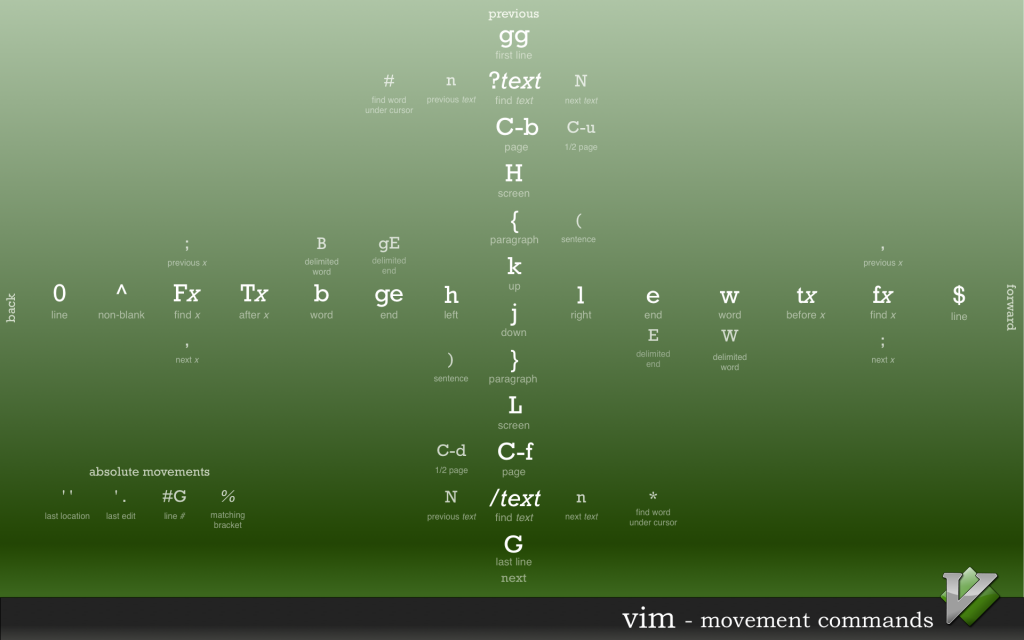
<li><a href="http://www.rosipov.com/images/posts/vim-movement-commands-cheatsheet.png" rel="noopener noreferrer">http://www.rosipov.com/images/posts/vim-movement-commands-cheatsheet.png</a></li>
</ul>
]]></content>
    <link rel="alternate" href="https://www.trackawesomelist.com/2016/01/13/"/>
    <summary>4 awesome projects updated on Jan 13, 2016</summary>
  </entry>
  <entry>
    <id>https://www.trackawesomelist.com/2016/01/10/</id>
    <title>Vim Galore Updates on Jan 10, 2016</title>
    <updated>2016-01-10T15:23:06.000Z</updated>
    <published>2016-01-10T15:23:06.000Z</published>
    <content type="html"><![CDATA[<h3><p>Delays when using escape key in terminal / Screencasts</p>
</h3>
<ul>
<li><code>&lt;esc&gt;</code> is used a lot for returning to normal mode or quitting an action.</li>
</ul>

<ul>
<li>Cursor keys are encoded using escape sequences.</li>
</ul>

<ul>
<li>Vim expects <kbd>Alt</kbd> (also called <em>Meta key</em>) to send a proper 8-bit
encoding with the high bit set, but many terminal emulators don't support it
(or don't enable it by default) and send an escape sequence instead.</li>
</ul>
]]></content>
    <link rel="alternate" href="https://www.trackawesomelist.com/2016/01/10/"/>
    <summary>3 awesome projects updated on Jan 10, 2016</summary>
  </entry>
  <entry>
    <id>https://www.trackawesomelist.com/2016/01/05/</id>
    <title>Vim Galore Updates on Jan 05, 2016</title>
    <updated>2016-01-05T22:22:46.000Z</updated>
    <published>2016-01-05T14:08:21.000Z</published>
    <content type="html"><![CDATA[<h3><p>Getting help offline</p>
</h3>
<ul>
<li>options are enclosed in single quotes, e.g. <code>:h 'textwidth'</code></li>
</ul>
<h3><p>Vim distributions / Screencasts</p>
</h3>
<ul>
<li><a href="http://cream.sourceforge.net" rel="noopener noreferrer">cream</a></li>
</ul>

<ul>
<li><a href="https://github.com/carlhuda/janus.git" rel="noopener noreferrer">janus</a></li>
</ul>

<ul>
<li><a href="https://github.com/spf13/spf13-vim" rel="noopener noreferrer">spf13 (⭐15k)</a></li>
</ul>
]]></content>
    <link rel="alternate" href="https://www.trackawesomelist.com/2016/01/05/"/>
    <summary>4 awesome projects updated on Jan 05, 2016</summary>
  </entry>
</feed>